Amazon
Published 9 min readAmazon A+ Content in 2026: what it is, who can use it and what to put in it
A+ Content is the designed section that brand-registered sellers can add below the bullet points on an Amazon listing. It replaces the plain product description with image and text modules, comparison charts and, through Brand Story, a brand-level band that appears on every listing. In 2026 Amazon was reported to open Premium A+ to all Brand Registry sellers and to add a content quality score, so it is worth revisiting what you have.
What A+ Content is
On a standard listing, the product description is plain text. A+ Content (formerly Enhanced Brand Content, EBC) lets a brand owner replace it with a set of designed modules: banner images, image-and-text blocks, feature grids, comparison charts and more. It appears in the "From the brand" and "Product description" areas of the listing, on desktop and in the app.
A+ Content does not change the title, bullets or images at the top of the page, and Amazon has said its text is not indexed for search in the way the title and bullets are. Its job is conversion: explaining, comparing and reassuring once a shopper is already on the page.
Who can use it
A+ Content requires the brand to be enrolled in Amazon Brand Registry, which in turn requires a registered trademark (or a pending application in some countries) and the brand owner's account. Sellers who are not the brand owner cannot add A+ Content to the brand's listings. If you are not enrolled, Brand Registry is the first step; we can walk through it as part of A+ Content work.
Basic, Premium and Brand Story
| Type | Where it appears | What it is for |
|---|---|---|
| Basic A+ | Product description area of a listing | Explaining one product: features, materials, use, care, comparison with the rest of the range |
| Premium A+ | Product description area, larger modules | Richer formats such as video, interactive hotspots and larger comparison charts |
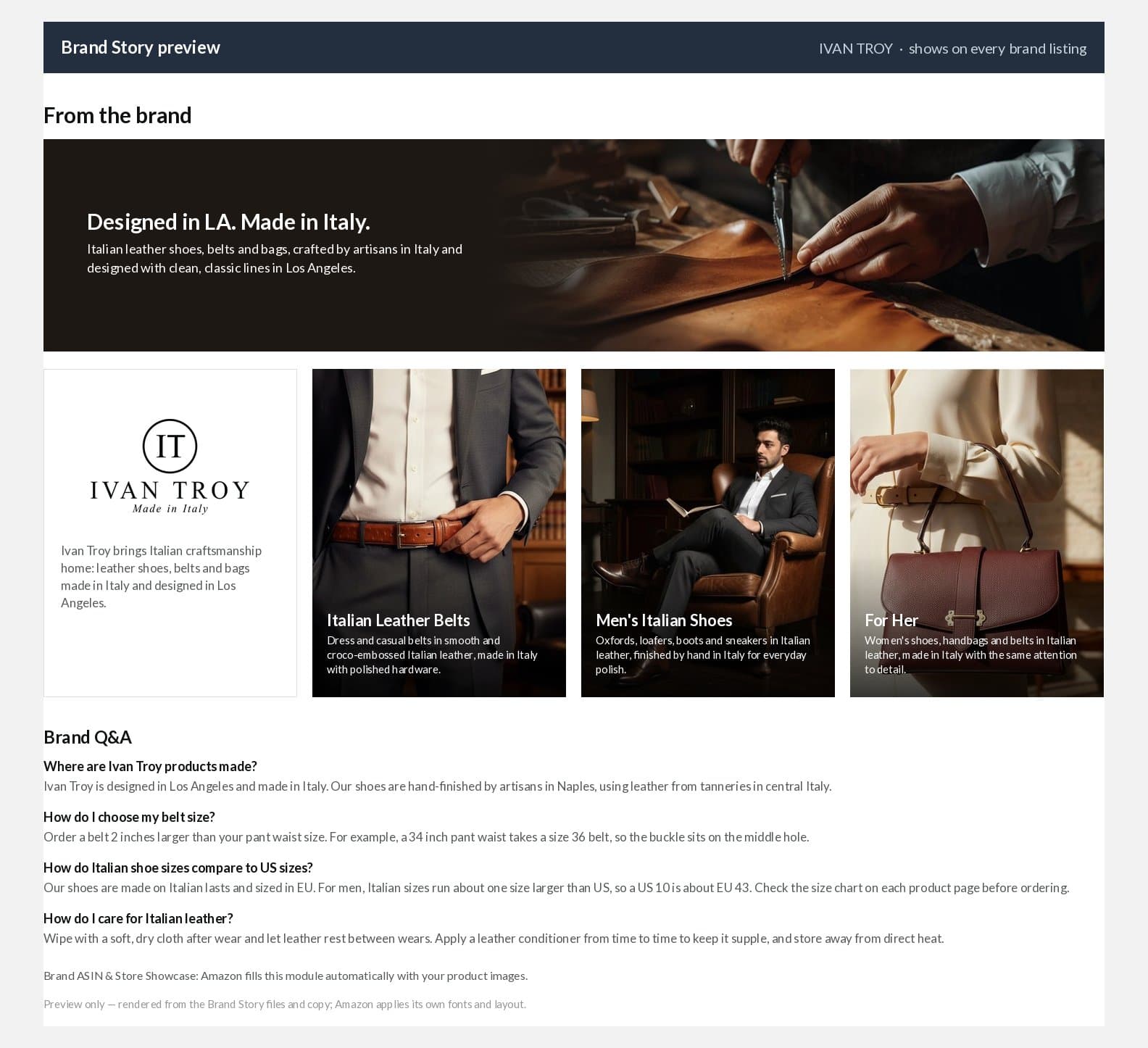
| Brand Story | "From the brand" band on every listing of the brand | The brand itself: origin, categories, navigation to other ranges, brand Q&A |
What to put in a product's A+ page
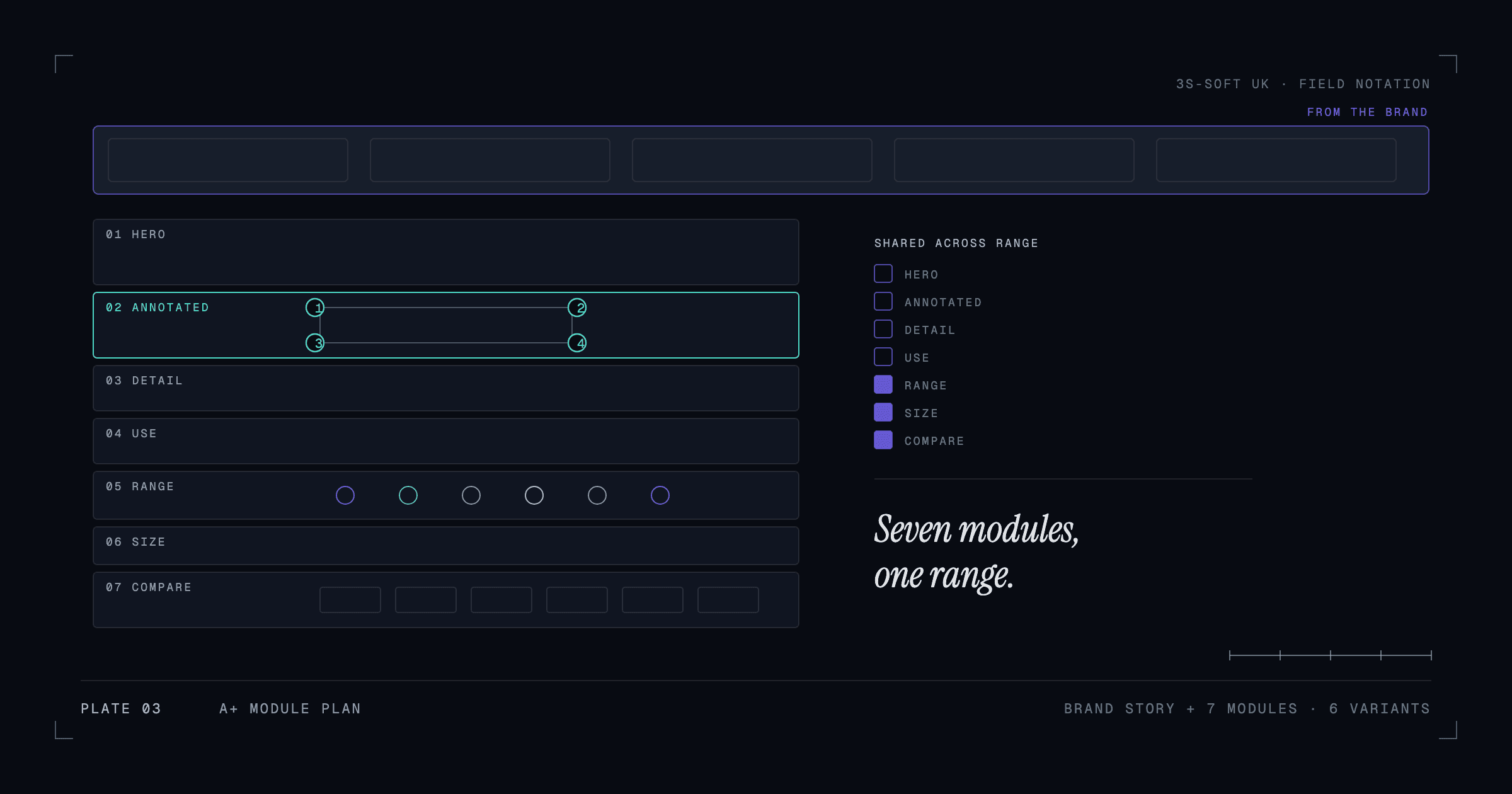
A module plan that works for most physical products, in reading order:
- Hero: the product name, the one-line reason to buy and a lifestyle or in-use image.
- Annotated product image: the product with three to five numbered callouts explaining the parts that matter (material, fixing, dimension, origin).
- Detail module: one close-up with a short paragraph on how it is made or what it is made from.
- Use or styling tiles: two or three images showing the product in context, each with a one-line caption.
- Range module: the product next to its siblings (colours, sizes, versions), so a shopper who wants a different one stays with the brand.
- Size or fit guide: a chart that answers the sizing question before it becomes a return.
- Comparison chart: the range side by side with the attributes shoppers compare.
The Ivan Troy case study shows this plan applied to a six-colour belt range, with a shared structure and colour-specific copy on each page.
What to put in the Brand Story
Brand Story is a horizontal, scrollable band that appears on every listing of the brand. Use it for what is true of the whole brand, not one product: where it is designed and made, what it stands for, its main categories with links, and a short Q&A answering the questions customers ask most (sizing conventions, care, origin). Keep each card to one idea; the band is read by scrolling on a phone.
Writing and design rules that keep A+ approved
- No pricing, promotions, shipping claims or time-sensitive language.
- No references to competitors, awards or guarantees you cannot substantiate, and no "best" or "number one" style superlatives.
- No contact details, URLs or calls to leave Amazon.
- Text in images must be legible on a phone; keep image text large and put the detail in the module's text field.
- Use the alt-text fields on every image; they are read by screen readers and support accessibility.
- Match the listing's claims exactly. A+ that contradicts the bullets is a common rejection reason.
Reusing one set across a range
A+ Content can be applied to many ASINs at once, which is how a range stays consistent. Build the shared modules (range, size guide, comparison chart) once and apply them to every variant; build the hero and detail modules per colour or version. When you add a product to the range, you update the shared modules and create one new hero, rather than starting from scratch.
How to tell whether it is working
Compare the listing's conversion rate (orders per session) in Business Reports for the weeks before and after publishing, and watch for changes in returns and in the questions customers ask. A+ Content is one factor among price, reviews and stock, so look for direction rather than a precise number, and give it a few weeks. Amazon's A+ experiments feature, where available, lets brand owners A/B test two versions directly.
Key takeaways
- A+ Content is for conversion on the page; title, bullets and images still do the work of being found.
- Brand Registry is required; it is the first step if you are not enrolled.
- Use Brand Story for the brand, Basic or Premium A+ for the product.
- A seven-module plan (hero, annotated shot, detail, use tiles, range, size guide, comparison) covers most physical products.
- Build shared modules once and apply them across the range.
Frequently asked questions
Is Amazon A+ Content free?
Basic A+ Content and Brand Story have no fee for Brand Registry sellers. Reports in 2026 indicate Premium A+ was also opened to Brand Registry sellers without a fee; confirm in your own A+ Content Manager, as availability can differ by account and marketplace.
Does A+ Content help Amazon SEO?
Not directly. Amazon has stated that A+ text is not indexed like the title and bullets. It can help indirectly by improving conversion, which is one of the signals Amazon's ranking uses, but the visible listing fields remain the place for search terms.
Can I use A+ Content on Amazon.co.uk and Amazon.com with the same modules?
You can reuse the design, but the content should be localised: British spelling, metric units and UK sizing on Amazon.co.uk, and the equivalent for the US. Each marketplace has its own A+ Content Manager.
How long does A+ Content take to be approved?
Amazon reviews submissions and typically responds within a few days; rejections name the rule that was broken. Pricing language, unsupported claims and contradictions with the listing are the usual reasons.
How we can help
- A+ Content and Enhanced Brand Content
Designed A+ modules for brand-registered products that explain, compare and reassure.
- Amazon listing and content optimisation
Amazon listings created and optimised for how shoppers search and compare, including Amazon SEO fundamentals.