Technical SEO
Published 8 min readWhy your product pages load slowly, and the fixes that matter
Slow product pages have a short list of usual causes: images that are far larger than the space they fill, third-party apps and tracking scripts that run before the page is usable, web fonts that block text from appearing, and themes that ship every feature whether or not you use it. Measure with Core Web Vitals, fix images and scripts first, and you will usually see the largest gain for the least work.
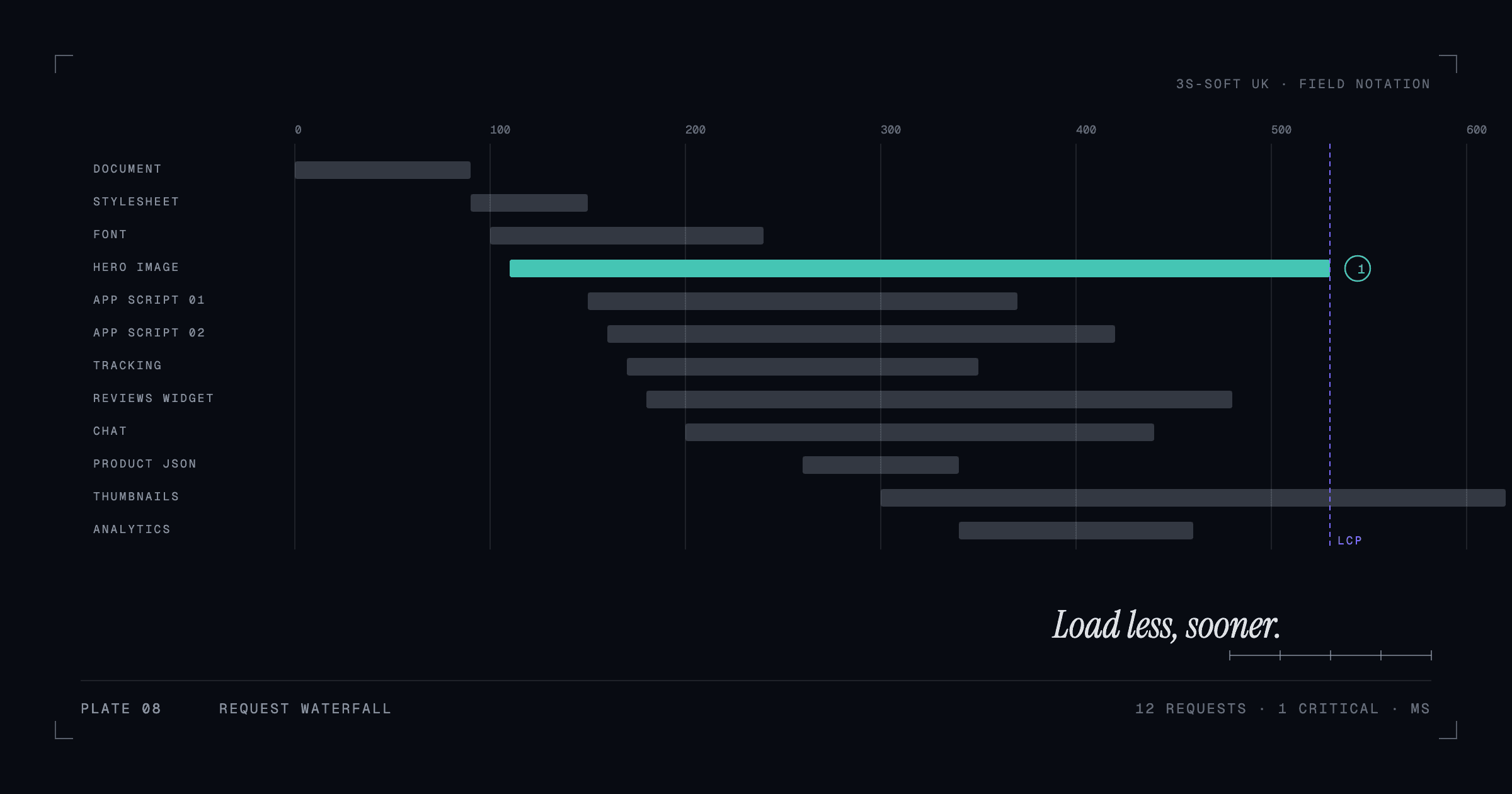
What to measure, and what the numbers mean
Google's Core Web Vitals are the practical yardstick: Largest Contentful Paint (how long until the main content is visible), Interaction to Next Paint (how quickly the page responds to a tap or click) and Cumulative Layout Shift (how much the layout jumps while loading). PageSpeed Insights reports field data from real visitors when there is enough traffic, and lab data from a simulated test otherwise. Test product pages and collection pages, not just the home page, and test on the mobile setting, because that is where most shoppers are.
Images: the biggest, easiest win
Product photography is usually uploaded straight from the camera: 4,000 pixels wide, several megabytes, displayed in a 600-pixel slot. Each one delays the Largest Contentful Paint. The fix is systematic rather than clever.
- Serve images at the size they are displayed, with responsive sizes for phone and desktop.
- Use modern formats (WebP or AVIF) with JPEG fallbacks where the platform handles it; Shopify and most image CDNs do this automatically if the theme asks correctly.
- Lazy-load everything below the fold, but never the main product image.
- Set width and height on every image so the layout does not shift as they load.
Apps, plugins and tracking scripts
Every app installed on a store tends to add a script to every page, whether or not the page uses the feature. Reviews widgets, pop-ups, chat, heatmaps, multiple analytics tags and "trust" badges each cost time, and together they are the most common reason a store is slow to respond to taps. Audit the installed apps, remove what nobody uses, and make sure the uninstall actually removed the script from the theme. Load the rest after the page is interactive where the tool allows it.
This is where the platform choice shows. A WooCommerce site with forty plugins or a Shopify store with twenty apps will be slow however good the theme; see choosing a platform for a UK online store for why we favour a lean, purpose-built set-up.
Fonts and render-blocking resources
Web fonts loaded from a third party can hold back the text until the font arrives. Self-host fonts where possible, limit the number of weights, and use font-display swap so text appears immediately in a fallback. Likewise, CSS and JavaScript that must load before anything renders should be as small as possible; a theme that loads one large stylesheet for every page is a candidate for trimming.
Themes and the cost of unused features
Marketplace themes compete on features, so they ship sliders, mega menus, animations and layout options that most stores never switch on. The code still loads. A custom or carefully trimmed theme that includes only what the store uses is lighter by design. If you are on a feature-heavy theme, work with a developer to disable or remove the sections you do not use rather than hiding them with CSS, which still loads them.
Hosting and server response
On Shopify, hosting is handled. On WooCommerce or a custom build, time to first byte depends on the host, caching and database health. Use a host with server-side caching and a content delivery network, keep PHP and WordPress current, and cache product and collection pages. A slow server response delays everything else no matter how well the front end is built.
What to leave alone
Not every suggestion in a speed report is worth chasing. A few milliseconds from minifying an already small file, or a "fix" that removes a feature customers use, is not a good trade. Prioritise by the three vitals: anything that moves LCP, INP or CLS on product and collection pages is worth doing; anything that only moves a lab score by a point is not. We cover performance and technical SEO as part of website development and maintenance, and the checklist in what to consider before redesigning sets the targets up front.
Key takeaways
- Measure product and collection pages on mobile with Core Web Vitals, not just the home page.
- Oversized images are usually the largest and easiest fix.
- Audit apps and scripts; remove what nobody uses and confirm the code is gone.
- Self-host fonts, limit weights, use font-display swap.
- Trim themes to what the store uses; cache and host well on self-managed platforms.
Frequently asked questions
What is a good page load time for an e-commerce site?
Aim for Largest Contentful Paint under 2.5 seconds on mobile, Interaction to Next Paint under 200 milliseconds and Cumulative Layout Shift under 0.1. Those are Google's "good" thresholds for Core Web Vitals.
Why is my Shopify store slow when Shopify handles hosting?
Hosting is only part of it. Large images, many apps injecting scripts, heavy themes and third-party fonts all run in the visitor's browser and are the usual causes on Shopify.
Does page speed affect Google rankings?
Core Web Vitals are a ranking signal, though a modest one compared with relevance and content. Speed has a larger, more direct effect on whether visitors stay and buy.
Will removing apps break my store?
Remove one at a time, check the storefront and checkout after each, and confirm the app's script has been removed from the theme code. Keep a theme backup before you start.
How we can help
- Website maintenance and improvements
Updates, security, performance monitoring and small improvements on an agreed, ongoing basis.
- E-commerce websites
Online stores and Shopify storefronts built with the catalogue, performance and checkout experience in mind.
- Next.js and React development
Modern web applications and marketing sites built with React and Next.js for performance and flexibility.